
| Test Principle | Fluorescence Immunoassay |
| Throughput | >180 tests/hour (Quick Mode) |
| Display | 7-inch color touchscreen |

 Multiple Tests on a Single Device
 Auto-coding System with 2D Barcode
 Automatic Handwriting Recognition
 Small Sample Size
 High Accuracy & Reproducibility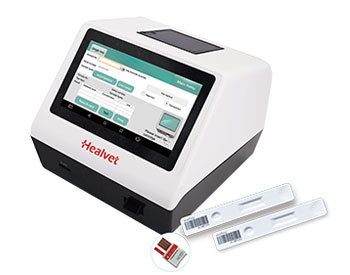
Model No.: HV-FIA 3000
Software Languages: English, Chinese, Spanish, French, Russian, Portuguese, Turkish, Italian, Polish, German
Power Adapter:100~240V, 50~60 Hz
Dimensions: 210*240 *195mm
Weight: 2.5kg
| Test Principle | Fluorescence Immunoassay |
| Throughput | >180 tests/hour (Quick Mode) |
| Display | 7-inch color touchscreen |
1. Turn on the power switch, HV-FIA 3000 will load on the system and enter the initial interface.
2. Click“Test”menu on the main screen. After self-checking success,the system will enter the test interface.
3. Slide the Dip Switch to“Standard Test”and make sure the indicator light is green.
4. Take ID Card out from the test kit, insert the Test ID Card, and then click “Read ID Card”.
5. Extract the blood specimen (e.g. for Prog: 75μL of plasma/serum or whole blood, Please refer to the instruction manual for different items volume), add it into buffer and mix thoroughly.
6. Take out the test cartridge from package, add 75μL of sample-buffer mixture into the sample well of test cartridge.
7. Immediately insert the test cartridge into the test cartridge holder of HV-FIA 3000 and click“Test”.
8. HV-FIA 3000 starts to count down 3 ~ 15 minutes depending on different test, when countdown time goes to 0 second, the analyzer will start to test and display the result.
9. Click“Print”to print the result.